
Mac users can go back to basics
Paintbrush is a user-friendly and lightweight paint program for Mac OS. The application draws inspiration from Microsoft Paint and comes as a replacement for Apple’s discontinued MacPaint tool. A basic illustration, painting, and doodling tool, it is ideal for all users who loved the simplicity of Paint and preferred it over more comprehensive software. The app is easy to install and supports several file formats, including JPEG, PNG, GIF, and more.
Top Recommended Alternative
Get creative with Paint’s well-loved features
Paint for Mac is designed to let people explore their creativity or complete simple image editing tasks. The easy-to-use software serves as a reminder of the good old days when people were getting familiar with using computers. The versatile tool comes with all the features that Paintbrush for Windows was known for and lets users create beautiful artwork in no time.
Simple and user-friendly interface
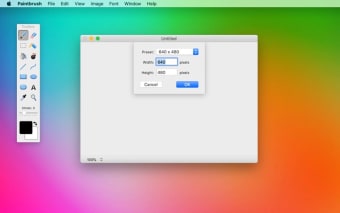
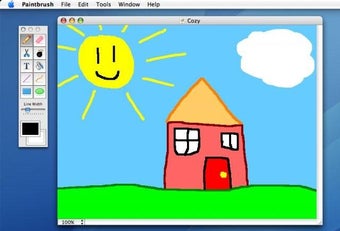
The great thing about this Microsoft Paint for Mac is that it has an eerily familiar interface. The layout of Paintbrush features a top menu as well as a floating menu with tools for drawing, coloring, and editing. The tool also lets users import images and screenshots for editing or highlighting purposes.
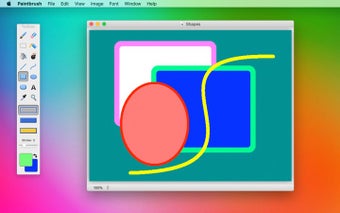
Though the software promotes freehand art, it does come with various functions that let users draw straight lines, circles, rectangles, and more. You can even add texts or resize images using this app. If you’ve worked with Microsoft Paint, you will find that the Mac equivalent of Paint behaves and looks pretty much the same.
Easy-to-use tools and functions
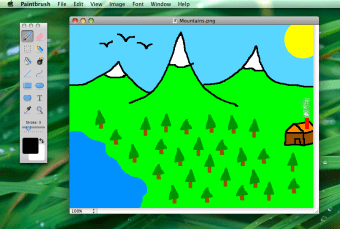
The Mac version of Paint comes with tools that let users draw using different colors and paintbrushes, create art from scratch, write or doodle over images, and complete simple edits. While it isn’t as robust as Photoshop, the paint app for Mac offers users a tool that doesn’t have complicated steps or fixed guidelines to follow.
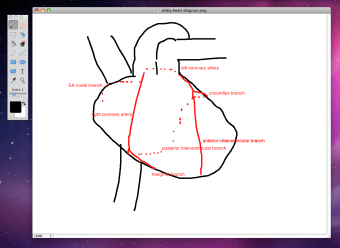
Since the app offers interaction with other files, it becomes easier for users to manipulate and edit images. Users can easily replace or remove backgrounds of images. Paint equivalent for Mac also lets users customize the thickness of strokes, change text font, fill color, and resize with just a few clicks. Furthermore, Mac Paint supports and saves files in JPEG, TIFF, BMP, GIF, and PNG formats, making it easier for Paintbrush to also double as an image editor.
A few unintended drawbacks
While the app has several tools, it also has a few drawbacks. One of them is the apparent difficulty of drawing with a touchpad or mouse. The app also doesn’t manage curves very well, so when drawing, you may have to try multiple times.
Apart from the difficulty, the app doesn’t let users add or save layers. Unlike Photoshop, users don’t have much room for mistakes. With layers, users can save sections that are complete. Mac Paint, however, only functions on the undo tool. Nonetheless, if you’re looking for an easy-to-use paint tool, you can’t go wrong with Paintbrush for Mac.
How do you use a paintbrush tool?
If you’re new to Paintbrush and wish to go ahead with Paint for Mac free download, you may want to know how to use the tool. For starters, the app lets you draw in freehand, so you can select a pencil or paintbrush tool from the top-menu and draw a path on the white background.
You can drag the pointer to make changes or use the eraser tool to get rid of errors. In case you create a closed shape, you can use fill the entire shape with the color of your choice. Apart from the basics, the app lets you pick shapes from the floating menu and fix the size as per your requirement.
Is Paintbrush free?
Paint for Mac download is free to use. While downloading Paintbrush, you may have to log in to the downloading site, but otherwise, you don’t need to share any details. Moreover, the app runs on a completely secure platform integral to Apple programs. The only thing you need to ensure is that you download the program from a website that is known to be safe.
Where can you run this program?
Paintbrush is one of the best painting apps available for Mac operating systems. The lightweight app is 4.45 MB in size and hardly uses any system resources. To function at an optimal level, this MS Paint for Mac only requires a 10.10.0 operating system.
Is there a drawing app on Mac?
When Apple released the original Macintosh, it contained MacWrite and MacPaint, two system applications that are no longer in use. While the former got an upgrade with TextEdit, Mac users never received a simple paint program.
Paintbrush for Mac is designed to fill the void that MacPaint created. While the app can in no way compete with powerful image editors like Lightroom, Illustrator, GIMP, and Corel Draw, it does fill the need of a native image editor.
How often is Paintbrush for Mac updated?
Paintbrush is very similar to MS Paint and doesn’t require frequent updates. However, the company continues to update the program regularly, so that Mac users don’t face any difficulties.
How do I download Paintbrush?
Paint download for Mac is very simple to execute and install. When prompted, you need to save the Paintbrush-2.5.zip folder and run the necessary installation steps. This Paint on Mac is safe to use and is only available for users with Mac OS systems.
Are there any alternatives?
While Paintbrush in itself is a great tool, you may also want to check out other paint in Mac tools that fulfill the same purpose. A few easy-to-use and straightforward alternatives are Mischief, Pixelmator, and Paint X Lite. Though these tools perform the same functions, a few of the alternatives have additional features.
Benefits of Paintbrush for Mac download
Regardless of the evolution of applications, MS Paint continues to hold a prominent place in Windows devices. It fulfills the basic requirements that a paint tool should be capable of executing. Paintbrush download for Mac fills the absence of an essential paint tool. It lets users doodle, create beautiful pieces of art, and edit images as required. While it isn’t as robust as other high-end drawing editors, it does provide the basic tools for simple art projects.
.jpg)










.webp)